Silence removal
Finds the pauses and never cuts into words. You decide how long a pause has to be before it goes.
RejiCut prepares the silences, “ums” and camera switches without you ever leaving Premiere. You listen, approve and apply it in one click.
Mac and Windows · One-minute setup
To be cutOne minute from a real episode: two mics, three cameras. Orange areas are the silences and “ums” RejiCut marked.
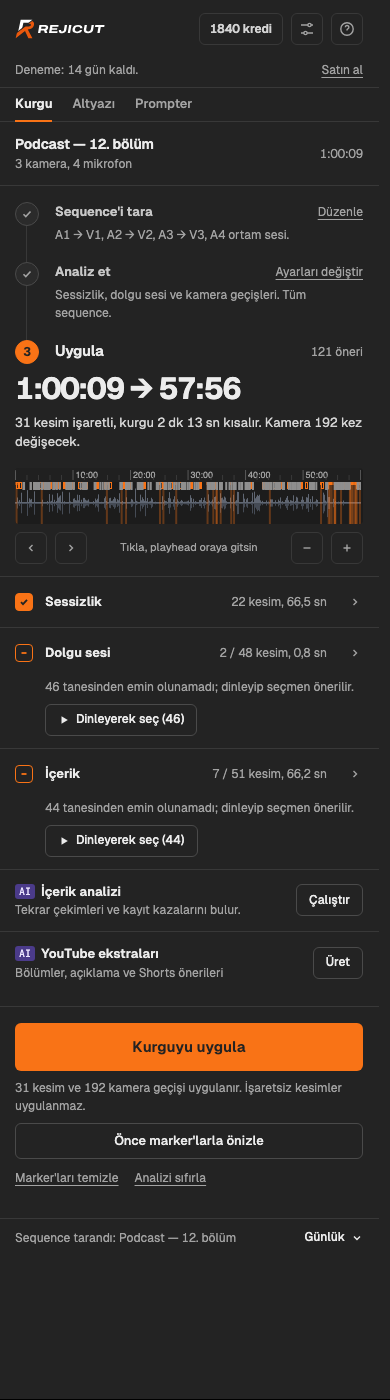
Cut and camera counts come from a real 43-minute conversation episode with default settings. Analysis time was measured on a different 31-minute episode in the RejiCut cloud, including the audio upload.
From silences to captions, from scripted shoots to YouTube descriptions. All inside Premiere, in one panel.
Finds the pauses and never cuts into words. You decide how long a pause has to be before it goes.
Marks the ones it's sure about; you listen and decide on the rest, one key to cut, one to keep.
Whoever is talking gets the camera. When needed, it hides a jump cut behind the wide shot.
If two people shared a mic, it tells their voices apart and switches cameras accordingly.
When guests sitting side by side bleed into each other's mics, it works out who is talking, word by word.
They arrive in Premiere as captions. You choose the maximum number of words per line.
When a conversation moves between languages, say Turkish, English and Arabic, it detects the language of each section.
Fixes misheard names and translates foreign-language passages into Turkish captions with the same timing.
Paste the script: it keeps the cleanest read of every line, suggests cutting the retakes and flags ad-libs separately.
Finds moments like “you can cut this part” or “how long have we been going?” and repeated sentences.
Chapter titles, a description and Shorts clip ideas, timed to your edit.
Analysis runs on RejiCut's servers: your computer stays cool and you don't need a powerful graphics card. The audio is deleted after analysis.
The RejiCut panel opens right next to Premiere. Scan your recording, analyze it, check the suggestions and apply.
Open your sequence and press Scan. RejiCut matches each mic to its camera; if it gets one wrong, fix it with a click.
It transcribes the conversation and places every word. Where the pauses are, where someone said “um”, who spoke when: it's all mapped out.
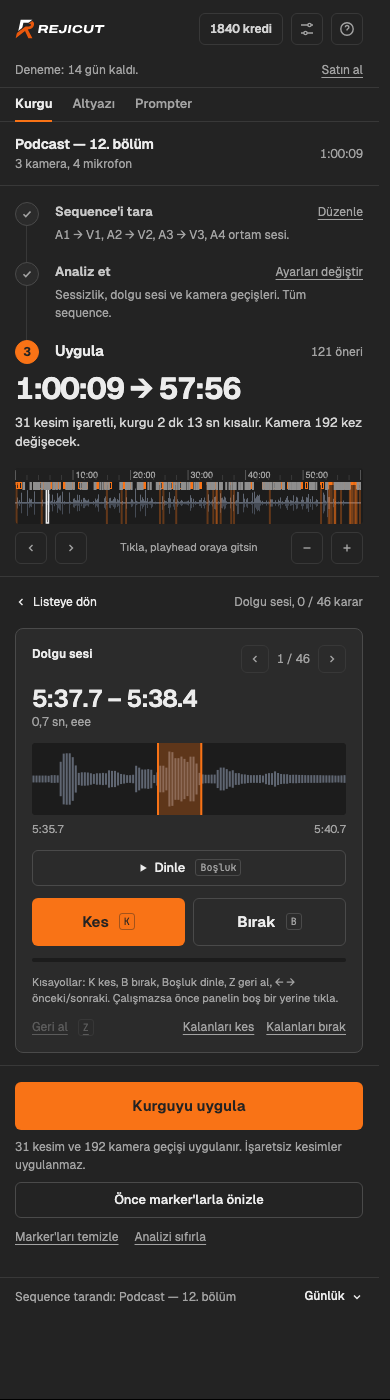
See the suggestions grouped by type and listen to the ones you're unsure about. Press Apply and the cuts and camera switches land on your timeline.
Instead of uploading your recording to a website and waiting, you carry on where you left off.
RejiCut improves every week. Here's what we're working on:
By looking at what you cut and what you keep, the next episode's suggestions get closer to your taste.
The Mac and Windows installers will be signed, so they install without a security warning.
The panel and its guide are coming in English; the analysis already understands many languages.
Moving to Adobe's next-generation extension system, so RejiCut keeps working in future Premiere versions.
Every plan includes monthly credits; analysis and AI features use credits. Content analysis is on Pro and Studio.
Every plan starts with a 14-day free trial, no card required. Cancel anytime.
No. RejiCut suggests, you approve. Suggestions are listed by type; untick the ones you don't want and listen to the ones you're unsure about. Nothing touches your timeline until you press Apply.
Premiere Pro 2020 and later, on Mac (Apple Silicon and Intel) and 64-bit Windows 10/11. Analysis runs in the RejiCut cloud, so your computer's power doesn't matter and it stays cool.
Yes. Analysis runs in the RejiCut cloud: your computer only compresses and sends the audio, and the edit plan comes back. Your video never leaves your computer, and the audio is deleted from the server within an hour of the analysis.
1 credit = 1 cent. Edit analysis, captions and prompter use 1 credit per minute of footage (a 30-minute episode ≈ 30 credits). AI features marked “AI credits” (recording mishaps, YouTube copy, caption spelling fixes and translation) use credits based on how much AI they need. The panel shows an estimate before every job. Credits arrive with your subscription every month; if you run out, you can buy more. You can see your balance and history on your account page.
One account can be signed in on two computers at a time. When you move to a third one, you choose which computer it replaces when you sign in.
Yes. It detects the spoken language on its own and handles recordings where the language changes from section to section. The panel itself is in Turkish for now; an English version is on the way.
Anytime, from the “Manage subscription” link on your account page or in the panel. You keep access until the end of the billing period. See the refund policy for refunds.
Not yet. Only Adobe Premiere Pro for now.
RejiCut grew out of the needs of a producer who edits multi-camera podcasts every week. Every feature was tuned on real episodes against hand-finished edits: how much breathing room to leave, which “um” to cut, when to switch cameras.
Got a suggestion or a question? Write to us; a real person reads and replies.
Edit your next episode with RejiCut. If you don't like it, you pay nothing.
Download RejiCut for free